
Since the emergence of COVID-19, many things in our lives have changed. Unfortunately, this virus has claimed the lives and health of far too many people. And in addition to affecting our health, it has forced us to change our day-to-day habits. Among other things, the lockdown caused by the state of emergency has led us all to stay indoors, in our homes and, in some cases, on board the boat. What could be better than remote working on board?
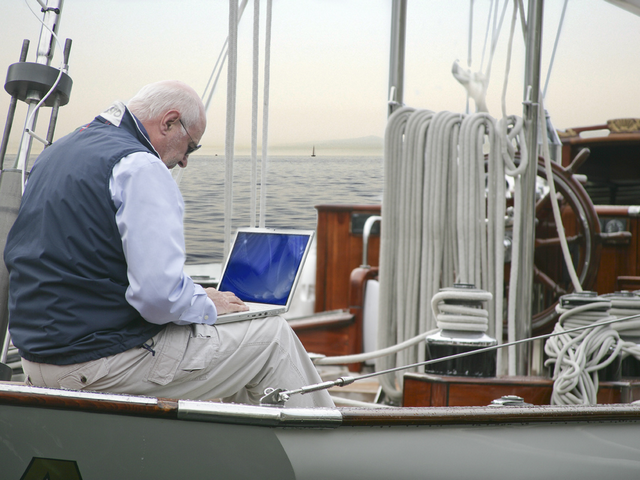
This unexpected scenario has forced most companies to enable remote work for their employees. And users, also out of necessity, have had to adopt remote-working tools which, in many cases, they had never used before, or only used occasionally, or as a stopgap during holidays or weekends.
Now this remote-working format has become a necessity—an indispensable means for companies and individuals—so it cannot become an obstacle that is slow and cumbersome to use.
Achieving 100% equivalence between the office work system and that of another location is difficult, but getting close to 99% is possible nowadays. New technologies, cloud-based systems and mobility platforms make it much easier to achieve this goal.
How do we determine whether a remote-working system is optimal? What parameters should we consider to know whether the system adopted is the best one? Without a doubt, the best scenario will be the one that comes closest to that 100% equivalence with performing the work at the usual position in the company.

The optimal scenario is the one that meets these 10 requirements:
Ease of establishing the connection
The way the connection is established must be easy and fast, without complications, with one or two steps at most. In some cases we have to go through several places to reach the access point that we would normally reach in a single step, and we waste so much time that starting work becomes a chore. It has to be just as fast as at the usual workstation.
Connection security
Once connected, data transmission must be secure, encrypted, protected against possible external attacks, information theft, passwords, bank details… Even if we think our information is of no interest to anyone, the reality is that any stolen data today is a valuable asset for any hacker.

Antivirus and anti-malware
All companies have antivirus and anti-malware protection systems for the equipment that forms part of their infrastructure. All servers, computers, laptops and other shared resources are protected. But this protection is lost when a user accesses the system from a computer outside the organisation, from home, or from a third party, without knowing whether the antivirus is up to date, or whether it has trojans or other malware that can unintentionally spread when connecting from that device to the company’s systems.
An optimal system must separate and isolate the device used for the connection so that, even if that device is infected, it does not affect the security of the systems it connects to.
Access to all resources
We need access to all resources: all folders, applications, servers and other elements that we can access from our usual workstation.
The optimal situation is the one that offers access to those resources in the same way as we would in a normal situation, without noticing any difference due to being outside the office.
High connection speed throughout the entire work session
If we have access to everything but the connection speed is slow, our productivity will decrease in proportion to the low speed, and it may even drive us to despair.
Work speed must be the same regardless of where we access from, and it should not depend too much on the quality of the access line we use. There are scenarios, such as on board a boat, where connection quality will not always be high. The remote-working system must be able to optimise that connection as much as possible and deliver the best performance.

Continuity of work
If we are working remotely—at home, on board, or wherever—it is more likely that we will have interruptions due to calls, tasks or other obligations or requirements that make us stop what we are doing and continue later. At our usual workstation we leave the computer running to go to a meeting, for example, and when we return we continue where we left off; but when working remotely we may need to shut down the computer or move it, and we also want to return to the point where we left it.
This need is one of the most important: to maintain continuity in what we are doing, at any time, from any location, without losing anything.
Electrical protection
In companies it is common to have the electrical system protected against disconnections, but on board it is possible to temporarily run out of power, whether in the marina, at anchor, with the generator or a converter. We all know that electricity is a precious commodity on board, and its continuity is not the same as what we have at work.
The remote-working system must be prepared for power failures, micro-outages or any other disconnection, so that we can reconnect at the point where we were, without losing anything.

Exactly the same access screen
One of the first things we notice when we connect from outside is: “In the office I have different icons and different shortcuts.”
Optimal remote working is the one that always keeps the same desktop for the user, from any location.
Screen resizing
Screen sizes are not always the same. At work we may have a large screen, or two; at home we may have a smaller screen or a different format; and on board, a laptop or an iPad. The system must automatically adapt to the size of the screen or screens we connect from, optimising the applications and even the layout of the icons.
No requirements or prior installations, from any device
And the last requirement is the option to be able to work from any device, whether a Windows PC, Mac, iPad, and even independently of the device’s performance. Even if we connect from a slow device, we must work with the resources of the system we connect to, which will always be better than those of the local device.
A good remote-working system also does not require us to prepare the device to be used in advance. It must be seamless and allow us to connect regardless of the device.
Original text from Náutica y Yates. You can find it at the following link: https://www.nauticayyates.com/equipo/teletrabajo-en-el-barco/

